 GrantConsole
What does the grant management process flow chart look like?
The chart moves from opportunity to accepted award, then through a repeating delivery-and-monitoring cycle into closeout. Its decision branch shows what to do when spending or delivery differs from the approved plan, a situation that a simple sequence of boxes can conceal.
This version is designed for US nonprofit grant recipients and the staff who coordinate their work. It is an operating aid, not an agency procedure or a complete description of every legal requirement. A recipient that makes subawards needs a separate monitoring branch for that additional responsibility.
For a larger view, open the full-size SVG chart or download the PNG. A step-by-step text version follows the diagram.
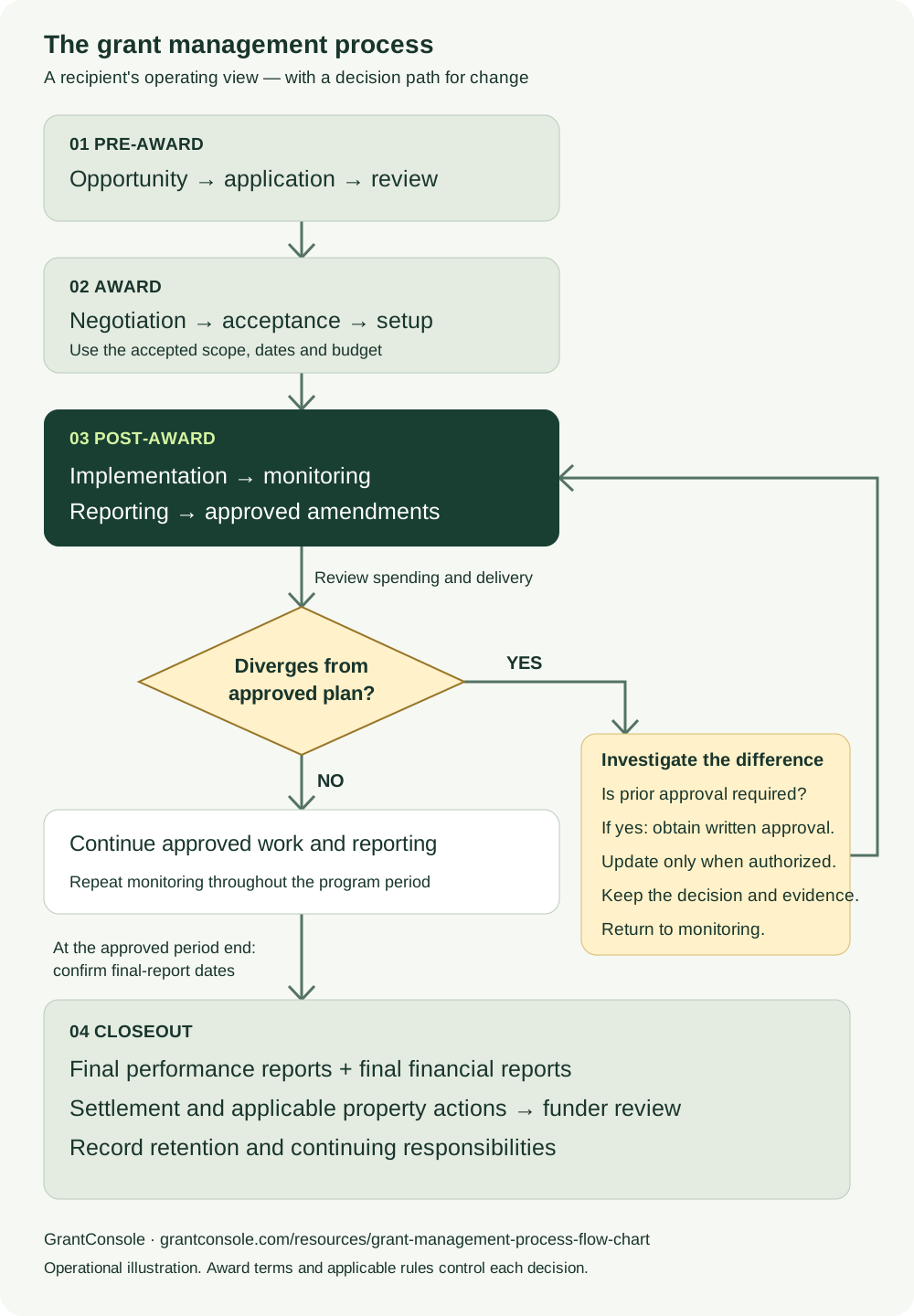
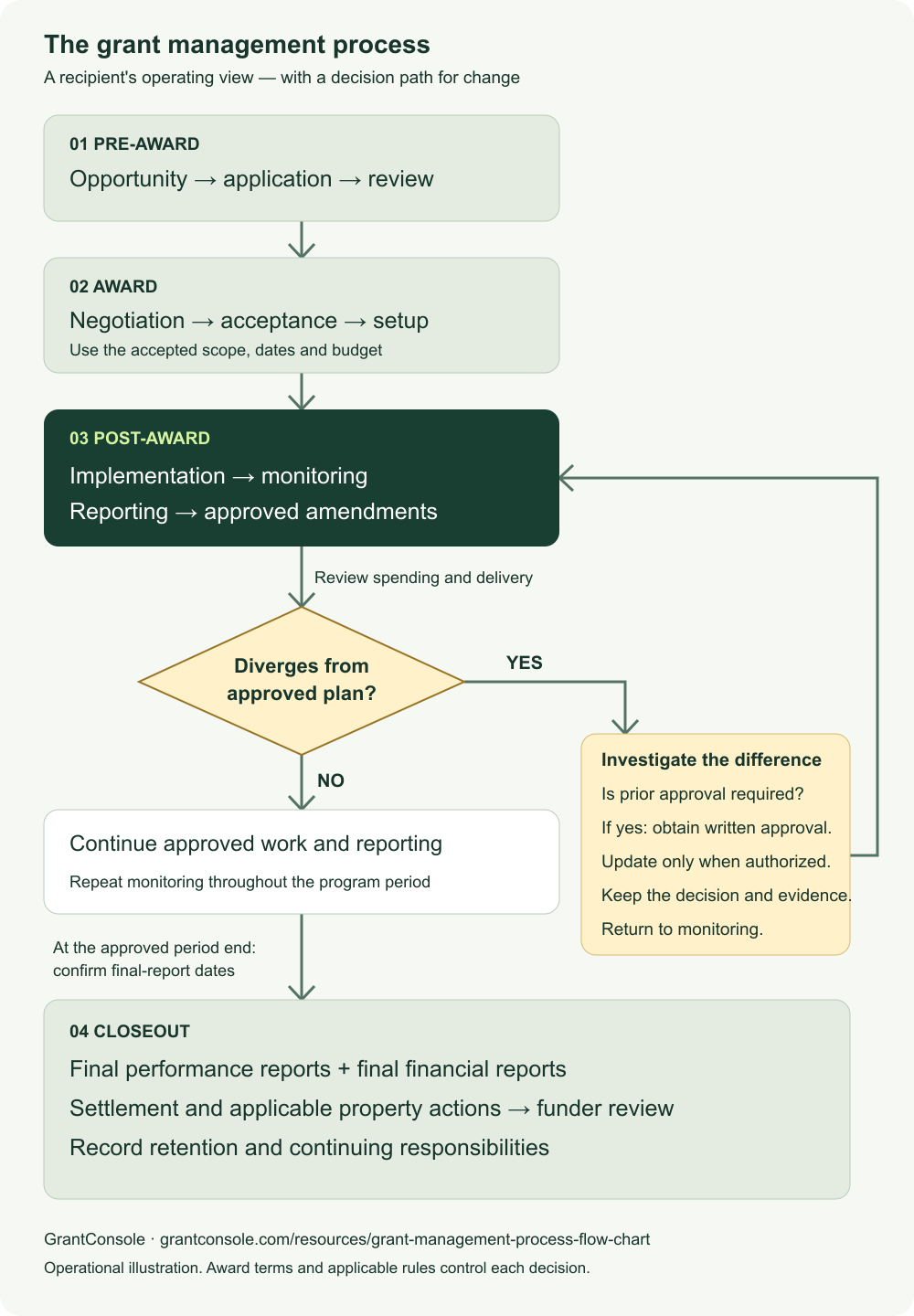
The phase names and decision labels above are selectable text. The explanation below describes the same sequence without requiring the diagram. The chart separates closeout for operational clarity; Grants.gov's federal lifecycle places closeout within the third, post-award phase.
What are the stages of the grants lifecycle?
For a recipient, the stages are preparing a feasible request, accepting an authorized award, delivering and monitoring the work, and completing final reporting and records responsibilities. Each stage should produce something concrete that the next person can use. The post-award grant management guide explains the broader responsibilities behind these handoffs.
Stage 1: Pre-award — opportunity, application and review
Pre-award begins with an opportunity assessment. Confirm the program fits the organization's mission and capacity, then review eligibility, restrictions, application requirements and the timetable. Develop a proposed scope, delivery approach and budget together so the application does not promise activity that the proposed funds cannot support.
Application review is principally the funder's decision process. The applicant responds to clarification requests and preserves the submitted version, associated budget and correspondence. An application receipt confirms submission, not approval or authorization to begin funded activity.
Output: the submitted application, proposed budget, decision record and any conditions that must be resolved if selected. Preserve those materials, but do not treat the initial proposal as the final operating authority if the award changes it.
Stage 2: Award — negotiation, acceptance and setup
The award stage turns a proposed project into an agreement the organization can administer. Clarify changes in scope, funding, dates, reporting or special conditions before authorized acceptance. Some awards allow negotiation; others present terms the recipient must accept or decline through a specified process.
Set up an award record using the accepted terms. Capture the funder and award identifier, approved amount and budget, performance dates, contacts, reporting periods, submission channels and approval requirements. Assign an accountable lead and the program and finance roles that will support the award.
For federal recipients and subrecipients, 2 CFR 200.302 requires financial records and systems that support identification of awards, required reporting and tracking of expenditures. Connect the operational award record to the accounting structure before spending information starts arriving.
Output: an authoritative award file, an obligation calendar, an approved-budget baseline and an evidence plan. The post-award checklist expands this handoff into individual tasks.
Stage 3: Post-award — implementation, monitoring, reporting and amendments
Post-award is a repeating cycle. Program staff deliver the work, finance maintains and reconciles financial information, and the grants lead coordinates obligations and submissions. Monitoring compares actual progress and spending with what the award requires.
Reports communicate that position to the funder, using the required format and channel. Under 2 CFR 200.329, federal performance reporting relates accomplishments to award objectives and includes applicable explanations for missed goals or cost overruns. Significant developments can require notification between scheduled reports, so the monitoring loop must have an escalation route.
At this node, GrantConsole compares recorded budget spending with the elapsed grant period and connects evidence to deliverables, helping staff identify records that need attention. The live demo shows that monitoring view with example data. People still determine whether the evidence is adequate and whether a difference requires a decision.
Output: dated financial reviews, supported performance results, approved submissions and a decision log. Use a recurring review rather than restarting the process every time a report is due. The multiple-grant tracking guide turns that loop into weekly obligation reviews, monthly financial checks and named actions.
Stage 4: Closeout — final reports, settlement and record retention
Closeout begins with an inventory of what remains: final performance and financial reports, unpaid obligations, unresolved balances, property information when applicable and questions from the funder. The project may have finished delivering services while some of those items remain outstanding.
Submit the required final information, retain receipts and track follow-up. A recipient's internal status change is not the same as the funder's determination that the award is closed. Assign a person to maintain records after the operating team moves to other work.
Output: the final submitted package, financial settlement record, funder correspondence, unresolved-items list if needed, and a retention schedule. The grant closeout checklist covers the recipient and subrecipient timing branches.
What happens when spending diverges from the approved grant budget?
Investigate the difference before changing the plan. A variance can come from timing, inaccurate data, an authorized pattern of spending or a substantive change that requires approval. The decision branch is therefore “what explains this, and what action is authorized?”
Start by checking the records. Confirm that expenses belong to the correct award and period, that posted amounts reconcile to accounting, and that commitments are understood. Then compare actual spending with the approved budget and the expected delivery schedule. A grant with planned equipment purchases near the start should not be judged solely against an even monthly spending line.
The next step is approval review. 2 CFR 200.308 sets federal requirements for budget and program revisions, including prior written approval for scope or objective changes. Other triggers and conditions also apply. A budget variance is not itself permission to transfer money, expand work or extend the award.
| What the review finds | Decision path | Record to preserve |
|---|---|---|
| Expected upfront cost | Confirm it is in the authorized budget and timing plan; continue monitoring | Explanation and current forecast |
| Incorrect posting | Use the organization's accounting correction process and reconcile again | Correction evidence and revised financial view |
| Delay with no proposed scope change | Assess effect on objectives and any notification or approval requirements | Delivery assessment and funder communication when required |
| Proposed scope or restricted budget change | Obtain required prior written approval before implementing it | Request, written decision and approved revised baseline |
| Work needs more time | Check extension authority and request procedures before the period ends | Approved extension or authorized notice and updated dates |
Section 200.308 includes rules for no-cost extensions, including a conditional agency-authorized one-time extension and notification requirements. Do not infer that every recipient can extend an award independently. Read the award's actual authorization and seek clarification if it is uncertain.
In a fictional example, a $200,000 award is halfway through its period with $130,000 spent. That is 65% of budget spent against 50% of time elapsed, a 15-percentage-point difference. The number describes timing; it does not establish overspending against the full budget or a rule violation. If an approved equipment purchase explains the difference and the remaining work is funded, document that conclusion. If staffing costs will exceed the remaining budget, escalate the forecast and evaluate the available authorized options.
Return to monitoring after the decision. Preserve the earlier approved budget and the amendment record so the next reviewer can understand why the baseline changed. The restricted funds guide explains how to read spending against both the budget and the grant period.
What is grants management at each handoff?
Grants management is the coordination of the money, work, obligations and evidence associated with a grant. At a handoff, its practical job is to make the next person's responsibility and source of authority clear.
| Handoff | What should move forward | What should not be assumed |
|---|---|---|
| Application to award setup | Approved scope, budget, conditions and agreement | That every requested activity or dollar was funded |
| Award setup to implementation | Named responsibilities, accounting mapping and evidence requirements | That a folder and an end date constitute a complete work plan |
| Program and finance to reporting | Reviewed results, reconciled financial information and explanations | That similar-looking figures use the same reporting period or definition |
| Monitoring to amendment | Identified issue, proposed action and required decision | That a warning or internal approval changes funder terms |
| Implementation to closeout | Final obligations, settlement work and reporting dates | That the last service-delivery date ends all duties |
For each handoff, record who prepared the information, who reviewed it and which version was passed forward. This can be a concise record; it does not require a separate lengthy narrative for every task. The reporting calendar template helps turn those handoffs into dated obligations.
GrantConsole's reporting packets collect budgets, deliverables, risk reasons and activity history in one view, which can support that review. A packet still needs accurate inputs and any additional forms or evidence required by the funder.
When does the grant process end?
The operating project ends according to its approved period and deliverables; closeout and continuing responsibilities follow their own requirements. Keep the period end, final-report deadline, financial settlement and funder closeout decision as distinct records.
For federal awards, 2 CFR 200.344 generally requires recipients to submit required reports and liquidate financial obligations within 120 calendar days after the period of performance. Subrecipients generally have 90 days, or an earlier date agreed with the pass-through entity. The federal agency or pass-through entity may approve justified extensions.
The closeout interval is not an automatic extension of ordinary program spending. 2 CFR 200.403 distinguishes administrative closeout costs from other costs and specifies timing conditions. Refer uncertain expense treatment to the finance lead and a qualified adviser.
For federal records, 2 CFR 200.334 generally starts a three-year retention period from the final financial report's submission, with separate provisions for renewed awards, property, unresolved proceedings and other circumstances. Private awards follow their own agreements and applicable law; do not transfer the federal timeline to every grant automatically.
How can I download or embed the grant process flow chart?
Use the SVG when you need scalable text and shapes, or the PNG for documents and presentation software that works better with a raster image. Both represent the same four phases and the same approval decision loop.
Download the grant process flow chart as SVG or the PNG version. Preserve the credit and link to this explanation so readers can inspect the context and sources.
Suggested attribution: “Grant management process flow chart by GrantConsole. Source: grantconsole.com/resources/grant-management-process-flow-chart.” If you alter the sequence for a particular program, label the version as adapted and identify the governing award instructions separately.
For a website, this example embeds the PNG with descriptive alternative text and a source link:
<figure>
  <img src="https://grantconsole.com/downloads/grant-management-process-flow-chart.png"
       alt="Grant process: pre-award, award, post-award monitoring with an approval loop, then closeout and record retention."
       width="1000" height="1440" style="max-width:100%;height:auto">
  <figcaption>
    Grant process diagram by
    <a href="https://grantconsole.com/resources/grant-management-process-flow-chart">GrantConsole</a>.
  </figcaption>
</figure>
When presenting the chart, keep the text description available alongside it. The most useful training exercise is to take one real award and identify the record that proves each handoff has occurred, then trace how the team would respond to the decision branch.