01Problem
Critical work lives everywhere.
- Deadlines disappear into individual calendars.
- Evidence sits apart from the report that needs it.
- Budget files tell different stories.
Post-award grant management software for nonprofits
GrantConsole brings deadlines, restricted budgets, evidence and funder reporting into one calm workspace—and names the rule behind every warning.
14-day trial · no card · seeded demo available
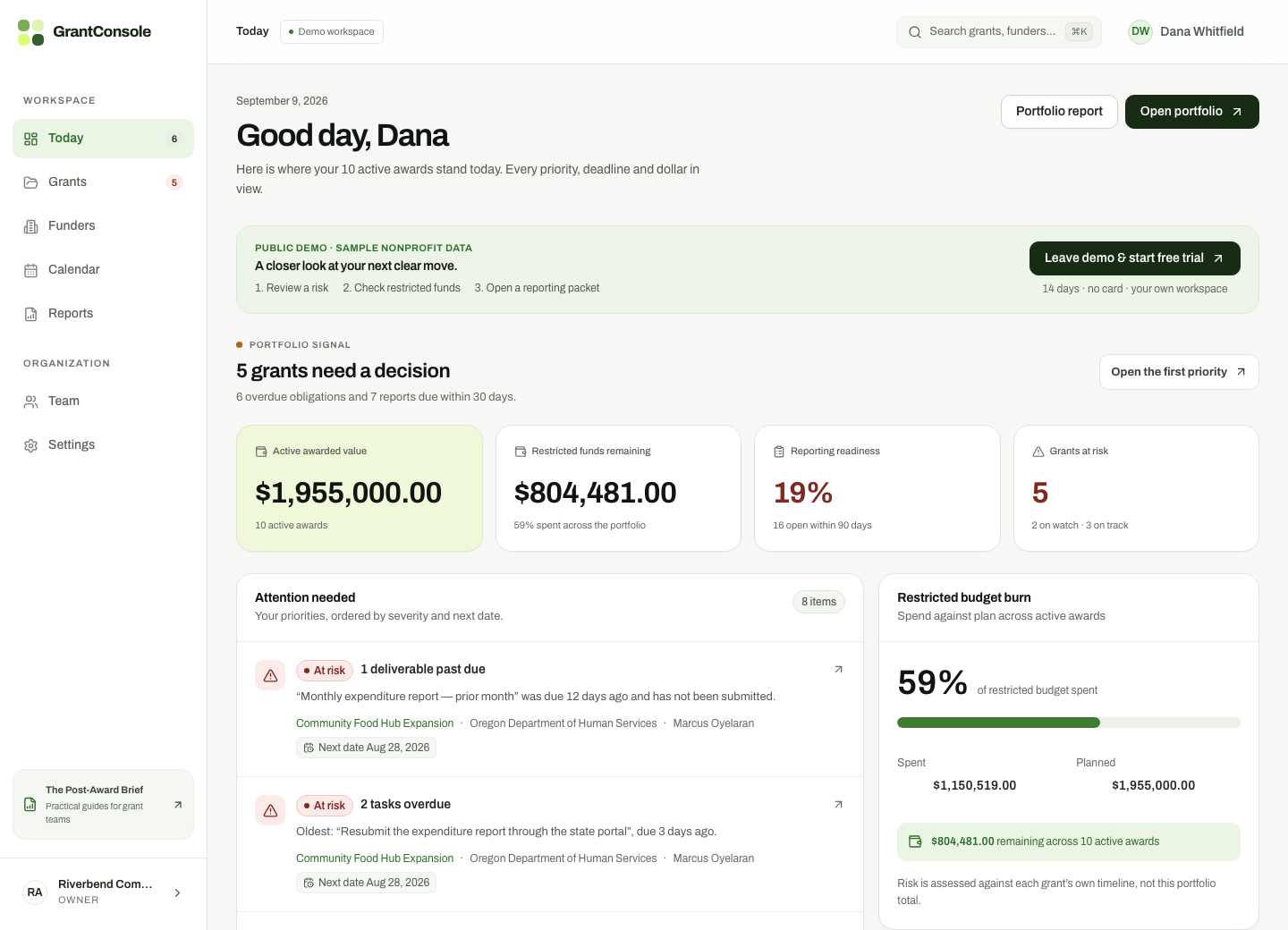
A complete working demo
The public demo contains two organizations, eighteen grants and the same structured workspace a nonprofit team would use to manage active awards and reporting obligations.
Grant work gets scattered
GrantConsole begins after the award letter, where spreadsheets, inboxes and shared drives stop giving teams a reliable answer.
Built around the real workflow
Clear product moments replace vague promises: risk rules, budget position and reporting readiness are visible in the records themselves.
Explainable risk signals
Eleven explicit rules evaluate the portfolio. When something needs attention, the signal identifies the grant, obligation, owner and supporting reason.
Community Food Hub Expansion · Rule 01 · Marcus Oyelaran
Household data export · Rule 03 · due inside 14 days
No renewal work scheduled · Rule 09
Restricted budget tracking
Budget burn is compared with the grant’s own period—not the calendar year—so finance teams can spot drift while there is still time to respond.
Reporting packets
Attach supporting files where the work happens, then bring budgets, deliverables, risk signals and activity history into one printable reporting packet.
The whole post-award workflow
Not fundraising CRM features. Focused operating tools for the awards your organization already holds.
Tasks, reports, renewals and period ends in month and agenda views.
Budget lines and actual spend measured against each grant period.
Receipts and documents attached directly to required deliverables.
Budget, obligations, risks and activity history in one exportable view.
Awarded value that must be re-won, quantified against the decision date.
Owner, manager, member and viewer access with recorded changes.
Walk into the product
Each demo account sees exactly what its permissions allow. The board treasurer is read-only by design.
Shared demo password: GrantConsole!Demo2026
FAQ
Still deciding whether the workflow fits? Explore the demo or email support@grantconsole.com.
GrantConsole is post-award grant management software for nonprofit grant recipients. It helps teams track deadlines, restricted budgets, evidence, risk and funder reports for grants they have already been awarded.
No. GrantConsole does not manage donors and does not find grant opportunities. It starts where fundraising ends: after the award.
Budget burn is tracked against the grant period, so teams can see whether a restricted budget is spending too quickly or too slowly and act before the period ends.
GrantConsole evaluates active grants against 11 explainable risk rules. When a rule flags a grant, the reason and supporting records are shown so staff can verify the warning.
Yes. A live demo seeded with example nonprofit data is publicly available without a sales call, and every new workspace starts with a 14-day free trial of every feature with no card required.
Plans start at $65 per month billed annually ($79 month-to-month) for up to 10 active grants, with Growth and Scale plans for larger portfolios. Every plan includes the core grant workflow; see the pricing page for limits and support.
Start a private 14-day trial with your own grants, or open the seeded workspace and inspect the rule behind every signal.